Discover the
Modern
WordPress with WordVell

Want AI to take real actions on your behalf rather than just responding to your questions?
But the problem is that AI Models can’t access your tools and databases. It can’t take any action until you connect it with your tools or databases by writing custom API integration code.
So, every new tool like Gmail, CRM, WordPress, Slack, etc. needs separate API integration to connect with an AI assistant.
This will consume so much time and effort in connecting and managing API connections between your tools and AI Models.
But one protocol just solved these both problems
In November 2024, Anthropic released the Model Context Protocol (MCP), an open-source standard that enables AI systems to connect to any tool, database, or platform via a universal interface and to take action.
Within weeks, the community built over 100 MCP servers. The GitHub repository hit thousands of stars.
Developers finally had what they’d been asking for: a USB-C for AI connections.
That’s why we want you to learn and use it in your workflow to improve productivity and efficiency, and save time by automating manual tasks.
By the end of this guide, you’ll understand exactly what MCP is, how MCP works, why major platforms are adopting it, and whether you should use it or not.
Let’s start by understanding its basic definition.
MCP stands for Model Context Protocol.
Think of it as USB-C for AI systems. Just as USB-C created a single universal port for all your devices, MCP creates a single universal way for AI to connect to any tool, database, or platform.

MCP standardizes how AI systems talk to everything else, just like HTTP standardized how websites communicate and SMTP standardized how emails travel.
No more writing custom integration code for each connection. No more maintaining dozens of different API wrappers. One protocol, unlimited connections.
Before MCP, connecting your AI to a new tool meant weeks of development work.
Each integration was a custom project with its own authentication, data formats, and error handling.
But with MCP, you weren’t writing API integration code. You were instantly building bridges.
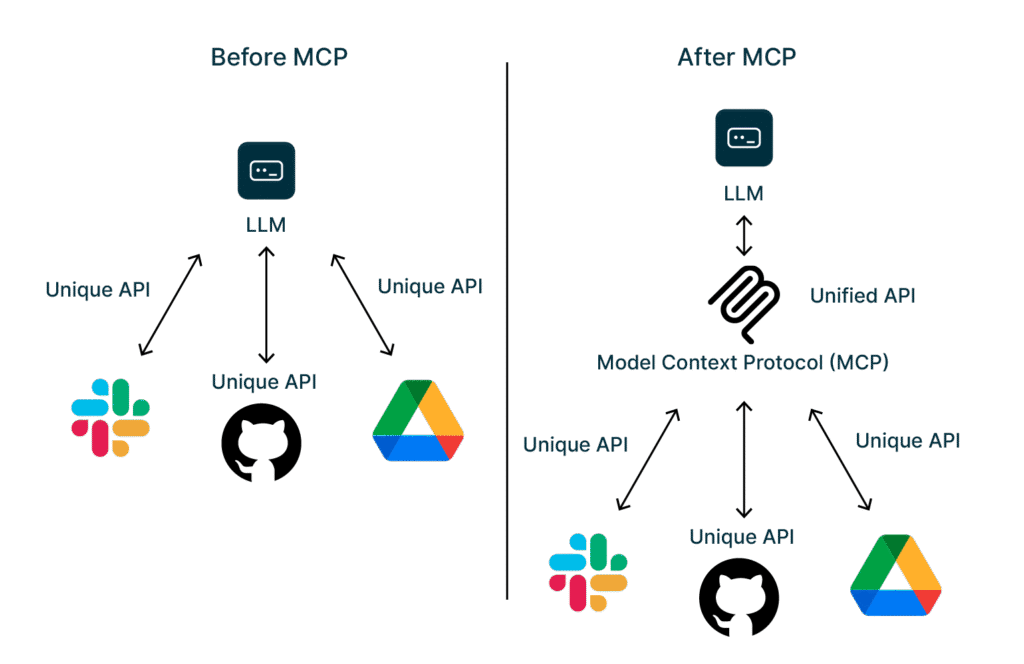
Here’s what changed:
| Without MCP | With MCP |
|---|---|
| Custom integration per tool | Universal connector |
| Vendor lock-in | Open standard |
| Complex and time-consuming integration | Easy setup |
| Fragile, breaks often | Stable, standardized |
| Your code to maintain | Community maintains |
Real impact?
A developer who previously spent 3 weeks integrating Slack, GitHub, and MySQL Database can now connect all three in an afternoon.
That’s a 95%-time reduction.
Anthropic launched MCP on November 25, 2024, with a clear mission: break down the walls between AI and the tools we actually use.
They made it open-source from day one. No licensing fees. No vendor control. The community could build, extend, and improve it freely.
The result?
Within a month, developers had created MCP servers for WordPress, Slack, GitHub, Google Drive, Notion, and dozens more platforms.
What started as an initiative from Anthropic became a community movement.
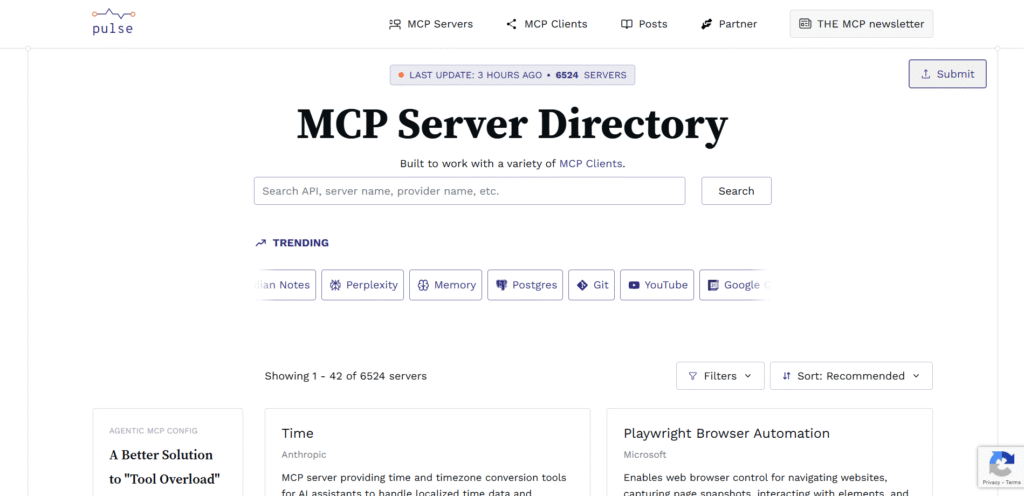
Here, you can find more than 6500 MCP servers in the PulseMCP directory alone.
MCP isn’t magic. It’s actually simple, once you see the three layers.
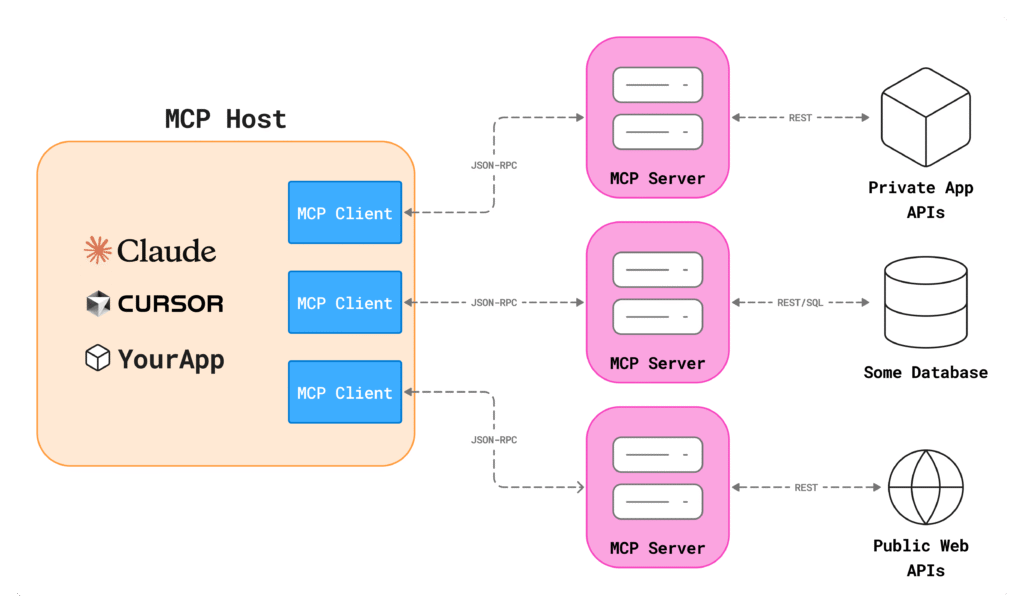
Think of it like a restaurant: you’re the customer, the waiter is the middleman, and the kitchen does the actual cooking. MCP works the same way.
Here are the Three Players…
These are your AI systems, such as Claude, ChatGPT, or any custom AI app you’ve built.
Their job? Run the AI models and coordinate everything.
When you ask Claude to “check my WordPress posts,” Claude is the host. It understands your request, figures out what needs to happen, and orchestrates the response.
Hosts don’t do the work themselves. They direct traffic.
This is the connector inside your host that handles the communication with the MCP server using JSON-RPC protocol.
It is a translator between what the AI wants and what your tools understand.
Clients handle the technical stuff like:
They convert your AI’s “I need to update a WordPress post” into the exact format the server expects.
You rarely interact with clients directly. They work quietly in the background, making sure everyone speaks the same language.
These are your actual tools: WordPress, GitHub, Slack, your PostgreSQL database, and your file system.
MCP servers wrap around these tools and expose their capabilities in a standardized way.
Instead of learning WordPress’s API, GitHub’s API, and Slack’s API separately, the AI just talks to the MCP servers.
The servers handle the tool-specific details.
Each server knows how to execute real operations: create a post, merge a pull request, send a message, query a database.
Let’s say you ask Claude: “Update my WordPress draft post with the latest statistics.”
Here’s what happens in 5 steps:
Behind the scenes, the actual protocol message looks like this:
{
  "method": "tools/call",
  "params": {
    "name": "update_post",
    "arguments": {
      "post_id": "123",
      "content": "Updated content with latest statistics...",
      "status": "draft"
    }
  }
}
Clean. Standardized. Predictable.
The beauty? This same pattern works for every tool. GitHub uses the same structure. Slack uses the same structure. Your custom internal API can use the same structure.
One protocol. Infinite possibilities.
MCP isn’t just about connections. It unlocks four distinct capabilities that transform what AI can actually do.
Let’s break them down.
What it does: AI can read files, databases, and APIs in real-time
Your AI needs context to be useful. MCP lets it pull information from anywhere, such as your MySQL database, configuration files, Slack message history, or WordPress content library.
Real use: You ask Claude, “What are our top-performing blog posts this month?”
It accesses your WordPress analytics, reads post metadata, and gives you ranked results.
No manual exports. No CSV uploads.
Why it matters: AI moves from answering generic questions to answering your questions with your data.
What it does: AI can trigger operations and make things happen
Reading data is one thing. Taking action is another level.
MCP lets AI send emails through your SMTP server, create Jira tickets, deploy code to staging, or update customer records in your CRM.
It goes from observer to operator.
Real use: “Publish my three draft WordPress posts and schedule social media announcements for each.”
The AI with publish the posts, update their status, and create your social content all without you touching WordPress or your scheduler.
Why it matters: You describe what you want. The AI executes it. That’s the productivity leap.
What it does: Dynamically loads context into AI conversations
This one’s less obvious but incredibly powerful.
MCP servers can automatically inject relevant information into prompts.
When you start a conversation about your product, the server loads your product docs. When you ask about a customer, it reveals their history and preferences.
Real use: You’re writing a technical blog post. The MCP server auto-loads your style guide, previous posts on similar topics, and current SEO keywords.
The AI writes with your voice, tone, and context without you pasting everything manually.
Why it matters: Better context provides better outputs. Automatically.
What it does: Protects your data and controls access at every level
MCP isn’t a free-for-all. Security is architected into the protocol:
Real use: Your marketing team’s AI can read blog posts, but can’t delete them. Your dev team’s AI can deploy code, but only to staging. Permissions enforce guardrails.
Why it matters: You can actually deploy this in production without losing sleep.
“Theory is nice. Here’s where MCP actually gets used.”
You don’t truly understand a technology until you see it in action.
MCP is one of those rare protocols that feels abstract on paper but painfully real when you plug it into your daily workflow.
Here’s where it proves its worth.
Most enterprises already use 6–10 internal tools just for customer support: CRM, ticketing, chat logs, knowledge bases, internal dashboards… the list never ends.
Before MCP?
Every integration with AI meant custom APIs, fragile scripts, and long email chains between teams.
With MCP:
A support AI can pull customer details from a CRM, fetch relevant knowledge base articles, and log a ticket update, all in a single request flow.
Impact: Companies report up to 70% faster issue resolution when AI assistants access unified internal data sources instead of working blindly.
If you’ve ever waited three days for a support ticket to move because “the system was slow,” you’ll instantly understand why this matters.
Imagine this:
You create a new push request on GitHub.
You ask Claude:
“Check my test coverage, review the code, and update the documentation based on the changes.
And Claude actually does it.
Why? Because it’s wired through MCP to your GitHub repo, documentation system, and testing tools.
No juggling tabs. No mental load. No “let me paste the code here.”
This is where MCP feels like magic, not by doing something new, but by removing everything that slows developers down.
WordPress runs 43% of the entire internet.
So, when an MCP lets AI talk to WordPress like a native user, the scale is massive.
What MCP enables inside WordPress:
Real Scenario:
A content manager tells Claude:
“Schedule 5 MCP-related posts for next week.”
Claude connects to the WordPress MCP server → creates drafts → adds categories → sets publish dates → confirms completion.
The manager never logs into the dashboard.

Explore our practical guide to connect Claude AI with WordPress using OttoKit MCP
Calendars, notes apps, email clients… they’ve lived in their own separate bubbles for years.
MCP bridges them.
Want your AI assistant to summarize emails, schedule calls, update your tasks, and save notes to Notion without forcing you to switch apps?
That’s the point.
The emotional benefit hits hardest here: you get your mental space back.
When you zoom out, the real power of Model Context Protocol (MCP) becomes obvious.
It isn’t just another tool. It reshapes how we build AI systems.
You might wonder: we already saw how MCP can be used. But why does it matter in the long term for developers, companies, and even the AI ecosystem at large?
Here’s the lowdown.
With Model Context Protocol (MCP), we move from separate integrations to a universal connector.
Build a connector once, and any MCP-compatible AI or tool can use it.
As MCP’s docs put it: It’s the “USB-C port for AI applications.” A universal bridge for tools and data.
That’s freedom. No vendor lock-in, no rewriting code for every new data source.
Because MCP is open-source (released by Anthropic in November 2024) and community-driven, improvements and new connectors evolve collaboratively.
“Instead of maintaining separate connectors for each data source, developers can now build against a standard protocol.” Forbes
That standardization isn’t just convenient, but it unlocks flexibility, consistency, and scalability.
Build once, deploy everywhere.
You get flexibility without reworking your infrastructure for each new tool.
MCP is built with security as a core concern,
This reduces the common mess with custom integrations, where every new tool could mean a new security vulnerability, but with MCP, you get a repeatable, reviewable process.
The ecosystem is still young. As adoption grows, expect even more servers, better documentation, and richer community resources.
The potential is big, but we’re only at the start.
MCP gives freedom, security, and scalability. The three things developers often trade off against each other.
With MCP, we get all three.
If you build web apps, SaaS, or plugins (like for WordPress), MCP could turn your monolithic integrations and custom connector code into clean, reusable modules.
In short, MCP isn’t hype. It’s a serious infrastructure move.
“Ready to use MCP? You have two paths.”
This is the moment when theory turns real.
You’ve learned what MCP is, why it matters, and where it shines.
Now it’s time to use it, and the good news is that you don’t have to be a developer to start.
MCP offers two simple on-ramps:
Install existing servers or build a custom one.
Choose the one that fits your workflow (or ambition).
Perfect for beginners, non-developers, and “I just want this to work” users.
The MCP ecosystem already has dozens of ready-made servers you can install with one command.
Think of them like plugins that teach your AI how to talk to WordPress, GitHub, Slack, PostgreSQL, your file system, and more.
Step-by-Step: How to Get Started
Popular MCP Servers You Can Use Today
(Check out our step-by-step guide on Connecting WordPress with Claude AI using OttoKit MCP Server)
If your tools are already supported, you’re minutes away from real automations.
For developers, product teams, and ambitious builders.
You’ll want to build a custom MCP server when:
Here’s what you need:
Minimal Example in Python
from mcp import Server

server = Server("my-custom-tool")

@server.tool()
def my_custom_action(param1: str):
    # Your logic here
    return {"result": "Task completed"}
Deploy it, register it, and your AI can now call your tool like a built-in capability.
Check out the official documentation to build your own custom MCP server
If you’re rolling MCP out across a team or company, think like an engineer and a security lead:
The secret?
Start small. Build one workflow. Test it. Expand.
The Challenges You Should Know About
MCP is powerful. But it’s not perfect (yet).
Let’s stay honest here. Every groundbreaking technology arrives with rough edges.
MCP is no exception.
MCP feels fast, but it’s not instant.
If your workflow depends on multiple MCP servers talking to each other, small delays can stack up.
Network latency happens. Coordination overhead happens.
For 90% of use cases? It’s fast enough.
For high-frequency, high-precision automation?
You’ll need smart caching or local-first setups.
Your data may pass through multiple layers, such as client → server → model → back again.
That means you must think about governance, logging, and retention.
The fix?
Run sensitive workflows on local MCP servers whenever possible. (And yes, many developers on GitHub are asking for more privacy tooling. It’s coming.)
What happens when a server crashes mid-task?
Or your model disconnects?
Or a tool doesn’t respond?
Today, MCP handles errors decently, not beautifully.
Graceful degradation still feels like a “work in progress,” and the community openly admits it.
Fallback logic is your friend.
New mental model. New architecture. New workflows.
Docs?
Good, but evolving. (You’re early. That’s both exciting and slightly painful.)
We are also facing many problems in integrations due to evolving docs.
Most developers say it takes a few days to “get it.”
Then everything clicks.
| Challenge | Impact Level | Workaround |
|---|---|---|
| Performance | Medium | Local servers, caching |
| Privacy | High | Strong data governance policies |
| Errors | Medium | Fallback + retry strategies |
| Learning Curve | Low–Medium | Community docs, GitHub examples |
This isn’t a sales pitch.
It’s the reality thousands of early adopters are sharing on GitHub and dev forums.
MCP is game-changing and still growing into itself.
MCP is still young, but its trajectory feels big.
Really big.
More platforms will adopt MCP as a default integration layer.
We’ll see a richer ecosystem of servers for databases, CMSs, cloud tools, dev environments, analytics engines, and basically everything.
Performance will tighten, especially around multi-server orchestration.
And enterprise features (RBAC, audit logs, compliance tooling) are almost guaranteed.
If the pattern holds, MCP may quietly become the “API of AI-powered software.”
This is where things get exciting.
If MCP succeeds, although it is still making a huge impact, integrating AI into apps could become simpler.
Developers might stop thinking about “AI integrations” entirely and start thinking in terms of capabilities and tools.
Speculation (clearly marked):
MCP could make building AI-first apps as easy as building modern websites.
Several AI ecosystem experts have hinted that open protocols like MCP are the missing glue for scalable AI automation.
Keep an eye on:
Many researchers say MCP represents a long-overdue shift from “AI as a feature” to “AI as a system-level interface.”
If they’re right, we’re watching the early chapters of a new standard unfold.
Final Words: Should You Care About MCP Right Now? Yes Definitely.
MCP is the simplest explanation of a big idea: an open protocol that connects AI models to real tools, safely and consistently.
Its three-layer architecture (host → client → server) finally gives developers a standardized way to build AI-powered workflows without APIs, plugins, or intense coding.
Is it perfect? No.
Is it growing fast? Absolutely.
And that’s exactly why now is the right time to care.
If you’re a developer, explore the MCP SDK this week.
If you’re simply curious, test a small WordPress + Claude integration and watch what happens.
(You can also get a guide for this here)
MCP might not be the final answer for AI integration, but it’s the best standardized solution we have right now.
Explore the official docs, browse community repos, and keep experimenting.
And finally…
Subscribe to our newsletter for more WordPress guides, MCP automation strategies, tutorials, developer resources, and the latest WordPress news.