Discover the
Modern
WordPress with WordVell
Imagine this, you tell AI:
“Hey, publish that draft post or increase all WooCommerce prices by 10%.”
Seconds later… It’s done without opening the WordPress Dashboard and making manual clicks.
But the question arises that today’s AI is mostly talk. It can suggest ideas. It can write content.
Yet it can’t actually execute actions inside your WordPress site or another tool and platform unless you connect them through complex API integrations, automation bridges, and workflows that take weeks.
The Model Context Protocol (MCP) for WordPress addresses both of these problems.
MCP creates a standard bridge between AI models (such as Claude and ChatGPT) and real-world tools like WordPress, Gmail, Slack, etc.
So that AI can connect and understand your tools, resources, and workflows, to provide responses using real data and execute tasks securely.
With Model Context Protocol for WordPress, you unlock a new era. You just speak to AI, and AI will perform your tasks in WordPress.
By the end of this guide, you’ll know:
First, let’s understand the MCP…

Model Context Protocol (MCP) is a standardized protocol developed by Anthropic that lets AI safely access, understand, communicate with, and take action on real software, tools, and data, including your WordPress site.
You can think of MCP as a universal connector that simply connects AI Models with external tools securely and helps AI understand what exists inside your environment.
It tells the model what resources you have, where the data lives, and which tools it can use without guessing.
In practical terms, MCP lets AI read real WordPress files, fetch API data, examine database entries, trigger actions, and interact with plugins or workflows you expose.
It’s the bridge that connects your AI assistant to the “real state” of your website.
This matters because WordPress developers and agencies deal with scattered array of systems such as plugins, custom code, database tables, REST endpoints, WooCommerce stores, and content pipelines.
MCP provides AI with a structured, permission-based way to view the same data we see and act on it reliably.
This understanding of real data and context leads to the solution of the “AI hallucination” problem, which means the AI will not make wrong guesses when it lacks information.
Instead, it will use real files, real API responses, real settings, and real content from your site using MCP for taking action.
For Example, it needs to know your WordPress posts, products, users, and settings to take actions on them.
That’s why the understanding of real “Context” matters so much.
Let’s suppose you say:
“Claude, publish this WooCommerce product draft.”
Without the MCP context, AI has no clue where that draft lives.
But with MCP, it knows exactly which product, its price, inventory, and images, and pushes it live.
Explore our Detailed Guide on Model Context Protocol (MCP) here.
MCP didn’t appear out of nowhere. It grew out of very real problems that developers kept encountering. Here are some of the problems it solves, which highlights is importance:
Traditional AI models only know what’s in their training data.
They can’t see your WordPress post, pages, plugin settings, WooCommerce orders, custom post types, or custom-developed code of your plugin or theme.
So they guess in generating a response to you, and guessing creates hallucination. And they also don’t take any action.
MCP addresses this issue by providing AI with safe, real-time access to your actual data and environment, enabling it to respond and take action tailored to your context.
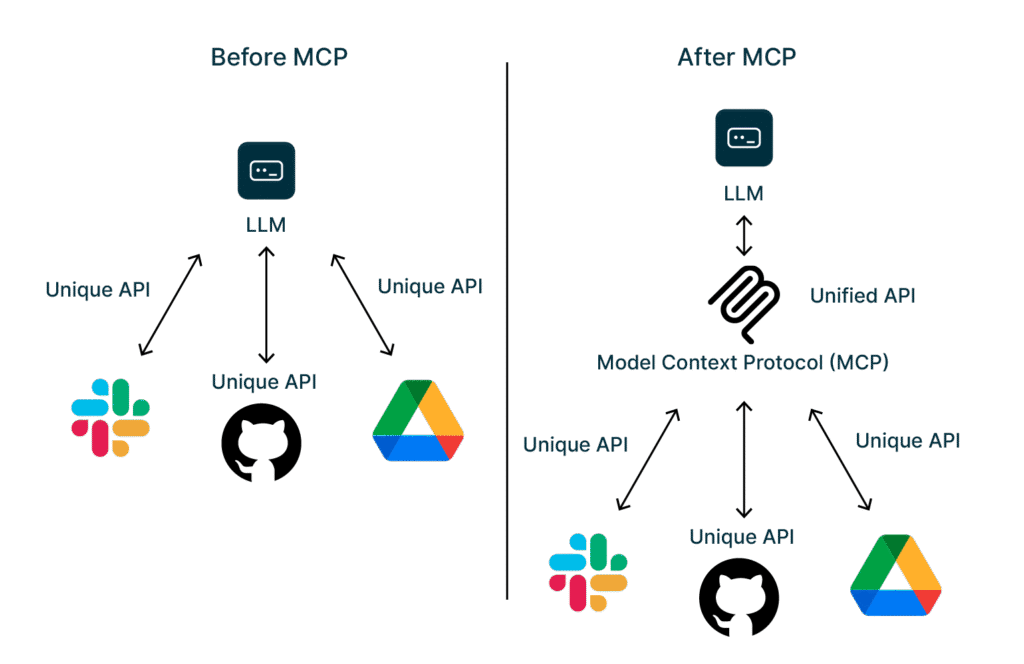
Before MCP, integrating AI with tools depended on building multiple API connections.
Every app or tool, such as WordPress, Slack, Jira, GitHub, etc., requires custom API integration with the AI app.
Each integration came with its own authentication flow, docs, versioning, rate limits, and unexpected quirks.
Due to this, Enterprises waste 30–60% of development time just connecting systems (Gartner).
So, MCP gives you one universal layer that allows you to connect AI with multiple external tools and resources rather than using multiple APIs.
APIs differ wildly, but MCP introduces a uniform structure using JSON-RPC language for AI models.
Due to this standardized language introduced by the MCP server, every AI model, either ChatGPT, Claude, or Gemini, can list the tools or functionalities available, understand how they work, and call them safely without glue code or guesswork to execute the tasks.
Retrieval-Augmented Generation (RAG) helps AI models to read external data and knowledge bases, but it can’t act on your data.
MCP gives two-way interaction. It allows AI to read data like RAG, but it also allows AI to take action.
For Example, you can read from a CRM data, update a WordPress post, sending an email all with the AI.
Developers and businesses need proper security and privacy during the interaction of their private and secure data with AI.
In Contrast, AI needs standarized way to extract real context and data to give tailored responses and run multi-step actions without guessing.
MCP fullfills these both needs of Developers and AI models.
MCP created a unified, controlled, auditable layer between the model and the tools, which prevents the LLM (AI) from directly accessing internal systems.
MCP also supports OAuth 2.1 authentication for authorized access and secure transports like HTTPS and TLS to ensure data is encrypted in transit.
Let’s break down the components of MCP and understand how the request flows through the MCP server:
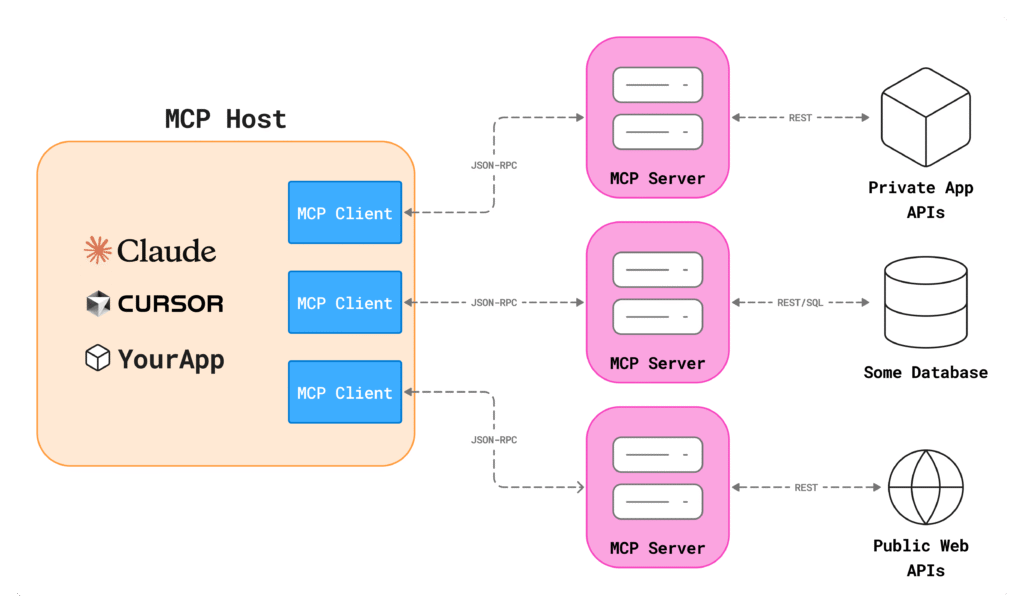
There are three main components in the MCP architecture. Let’s explore one by one:
The host is the user-interface and AI application with which you interact, such as Claude Desktop, ChatGPT, Cursor, or Gemini.
It allows user interaction, takes commands from the user, and performs the AI reasoning for further processing of the request through the MCP client.
It also manages one or multiple MCP clients.
A component inside the MCP host that converts your request into a standardized format, forwards your request to the MCP Server, and relays the response and context obtained from the MCP Server back to the Host for usage.
Technically, it handles transport details, routes, session management, signing, and communication protocols.
It doesn’t make decisions. It just delivers the right data to the right place.
A program that gives AI secure contextual access to external tools, data sources (databases, filesystems), or APIs. It extracts relevant context and forwards it to the MCP client for communication, and also executes actions inside tools based on instructions and allowed permissions.
For example, it accesses your WordPress APIs, database queries, filesystem access, plugin operations, and anything else you want, and can execute tasks like post publishing on your instructions.
Technically, the MCP server defines two layers:
Through these layers, it registers tools and resources, validates parameters, enforces permissions, and executes the real actions on your software stack with secure communication.
The good thing is that all this access is done through standardized secure protocols, and it can only access and take actions that are allowed.
Every AI response or decision now comes from your actual WordPress environment rather than assumptions based on training data or hallucinated context.
Throughout this entire flow, the model never touches raw databases, hidden credentials, internal code, or anything outside the boundaries you define.
Capabilities determine exactly what MCP can read and which actions the MCP Server can perform. This gives you a strict and reliable safety layer.
For a deeper understanding of the MCP architecture, explore the official MCP docs.
MCP works by sitting between the AI model and WordPress as a structured, permission-aware bridge.
Its job is simple: to expose the right WordPress data and provide the right tools to let AI take action only within the boundaries you define.
In this section, we’ll break down exactly how that bridge is created and how MCP servers communicate with WordPress.
In WordPress, the MCP server never taps into the database directly. It doesn’t override core files, bypass permissions, or act like a secret backdoor.
Instead, the bridge is established between WordPress and the MCP server using permission-based MCP data and the transport layer and WordPress APIs
The architecture and working of MCP servers depend on a principle that every interaction must use standardized data layer and transport layer protocols, regardless of the platform to which they connect.
These standards let developers build resources and tools in MCP servers that every AI model can safely discover, inspect, and use to fetch contextual data and perform real tasks through natural language.
When developers develop the MCP Server, it defines the data layer where developers use JSON-RPC 2.0 standards to define core primitives, which include MCP tools and resources.
For most WordPress MCP Servers, the tools and resources connected with WordPress are using the WordPress REST API (/wp-json/wp/v2/)
Although Newer MCP Servers, such as the WordPress MCP Adapter, rely on the WordPress Abilities API, which provides a more native, role-aware permission mapping.
The exact interaction depends on how the MCP server is built.
Some developers wire everything through REST routes, while others integrate through WordPress abilities or a hybrid approach. But the architectural logic stays the same.
In the MCP server, each tool and resource is fully defined with its name, purpose, expected parameters, the WordPress route or ability behind it, and the HTTP method (GET, POST, PUT, DELETE), and other necessary parameters.
This explicit definition is what allows AI models to understand the available capabilities without guessing.
The plugin you’ve seen does exactly this. It registers tools and resources, maps them to WordPress REST endpoints, and exposes them cleanly to AI.
When an AI triggers a request, the MCP server converts this request into the proper WordPress API call using its related tool or resource.
create_post tool becomes a POST request.update_post tool becomes a PUT request.search_posts resource becomes a structured GET query.The new MCP adapter follows the same MCP principles but uses the Abilities API instead of manual REST routing.
So, while the integration with WordPress may differ, either through REST API, Abilities API, or a custom proxy layer, the underlying MCP protocols will never change.
You have to define resources and tools, and map them to secure WordPress operations expose them to AI models through MCP’s standardized transport and data layers.
Every MCP server still needs valid WordPress authentication to access those REST endpoints.
That’s why most MCP servers require Application Passwords to operate. Application passwords have been built into WordPress since version 5.6 to make secure WordPress API calls from an external resource.
You generate a unique password for a specific WordPress user.
The MCP server uses the username and this application password through Basic Auth for all its REST API requests, making the entire system auditable and predictable.
Advanced setups can also use JWT or OAuth, especially if multiple users or role-specific contexts are needed.
But for most WordPress MCP servers, Application Passwords keep things simple and secure.
MCP resources are the sources that MCP can read-only to fetch the contextual data.
WordPress MCP Plugin exposes WordPress Site, Plugin, Settings, User, and Themes data as Resources.
For Example:
WordPress://site-info to retrieve the site informationWordPress://plugin-info fetches the plugins’ detailsWordPress://user-info provides information about registered WordPress users and their rolesWhen any information is requested, the AI model calls the relevant MCP resource and gets the required information.
MCP tools are the executable functions that allow AI to take real actions inside your connected platform or source.
Action can be API calls, database queries, updating CRM, or file operations.
MCP resources can only read data, whereas MCP tools can take actions.
In the WordPress MCP server, MCP Tool is a declared, schema-backed function that maps to a WordPress action using a REST API call.
For Example, in the WordPress MCP plugin:
wp_add_post uses /wp-json/wp/v2/posts route and POST method to add a new WordPress Postwp_update_post uses /wp-json/wp/v2/posts/{id} route and PUT method to update a WordPress post with IDSo, for every action, WordPress MCP server develops a tool that is connected to its respective REST API route so that you can securely execute tasks in WordPress using AI commands.
Here’s what the lifecycle actually looks like:
wp_search_posts or wp_get_post, to find the exact post and retrieve its details.wp_update_post, to prepare the action.PUT /wp-json/wp/v2/posts/{id}), and returns the result.This is clean, predictable, and fully aligned with WordPress best practices.
MCP doesn’t bypass WordPress permissions. But it fully complies with them.
The capability level of every MCP interaction is determined by the WordPress user account whose credentials the MCP server is using.
If you authenticate with an editor account, you get Editor-level access. If you authenticate with a Contributor account, you cannot publish posts even through AI.
MCP simply inherits whatever the user can and cannot do inside WordPress because, at the backend, it connects with WordPress APIs. When MCP calls the API, the API will run its validation before proceeding. If the user is not allowed to make that specific call, the permission error will return.
This means your existing WordPress role and capability structure becomes your MCP security model automatically without any extra configuration required.
MCP interacts with WordPress using a disciplined and secure approach. It uses declared resources, strict tool definitions, authenticated REST calls, and well-scoped permissions.
This structure highlights why MCP is the safest, cleanest, standardized, and most scalable way to bring real AI automation into your WordPress site.
There are multiple reasons why WordPress agencies and developers should adopt MCP for AI automation in their tasks and workflows.
Because this AI automation, with the help of MCP, will allow them to gain a competitive advantage across multiple aspects of their operations
Here are some reasons why WordPress developers and agencies should adopt MCP in their workflows:
AI automation in WordPress using MCP will help you save money in your operations.
According to McKinsey’s report, AI automation can reduce operational costs by up to 30%.
The question is, how will it happen?
Because AI will handle repetitive tasks and complete them without manual intervention, such as content and SEO audits, metadata fixes, weekly traffic analysis, themes & plugin updates, and answering customer queries based on real data.
Tasks that normally take minutes per click are executed in milliseconds by MCP-powered agents.
You will simply give a command in English, Arabic, French, Spanish, or German to Claude or ChatGPT, AI using the MCP server will fulfill your task in seconds.
GitHub also reports that the developers who are using AI coding assistants are completing their tasks up to 55% faster.
So, you can use AI to speed up your WordPress theme and plugin development.
You might observe that small and unnoticed tasks in daily operations drain your hours daily.
With the help of MCP, you can automate these tasks, which will help you save a lot of time, so that you can spend it on other product tasks.
Accenture research solidified that AI can save nearly 40% of working time across industries, especially in routine and daily tasks.
You can increase your profits and revenue through MCP-powered AI automation.
Because if you automate your multiple tasks or services at the backend, then you have more spare time to offer these same services to more clients with greater efficiency.
This will help you increase revenue through the scaling of your operations without a single new hire.
Now the world is moving towards automated AI systems that will monitor your real data and execute tasks automatically.
Gartner research highlights that the Enterprise AI automation industry is projected to reach $20B+ by 2027.
Anthropic is also actively pushing MCP as the standard for AI-tool integration. Although they have succeeded in much of their effort.
There is also a growing GitHub MCP ecosystem, which is building MCP servers for major platforms.
So, WordPress agencies or developers that adopt MCP-powered AI automations today will stay aligned with the future standard of automation.
They will move faster, smarter, and cheaper while their competitors remain stuck clicking menus.
Read our dedicated guide on why AI Automation is a Must-Have Skillset for WordPress Agencies and developers.
There are multiple MCP servers available to connect AI models with your WordPress site.
But here, we will help you connect Claude AI to WordPress via MCP with a simple and beginner-friendly approach.
You can follow our real and tested steps to complete this setup.
After the successful setup, your AI will communicate with WordPress securely and start automating tasks.
These are some requirements to check before going further:
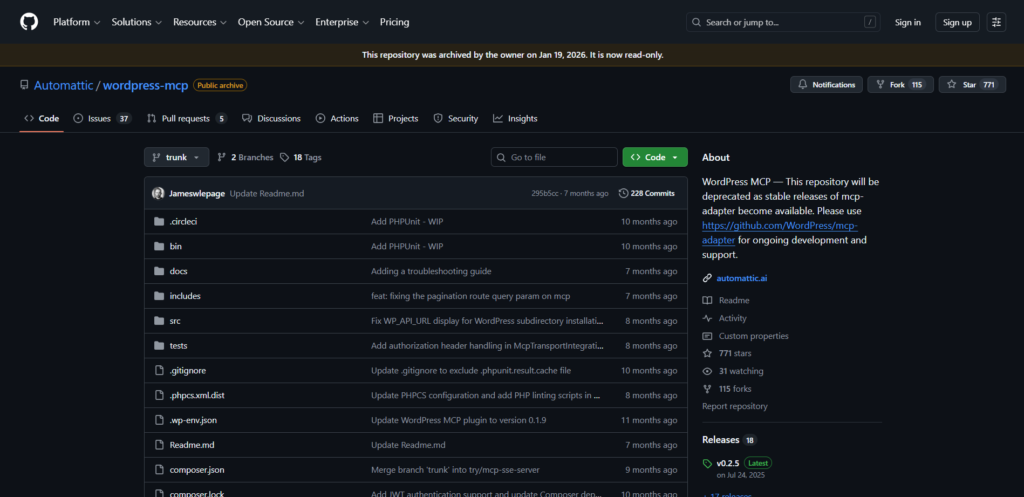
Now you have your WordPress site ready for connecting with AI.
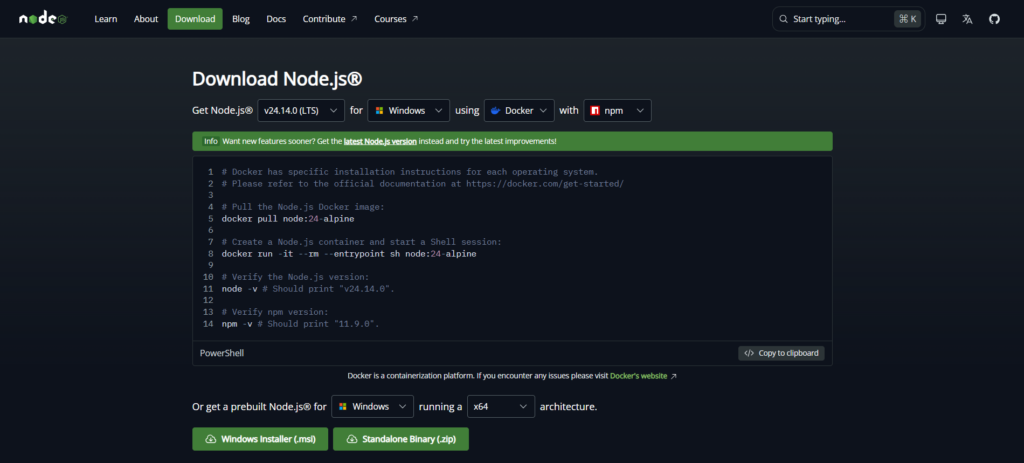
The MCP Server utilizes Node.js to execute commands. Download the latest Node.js from nodejs.org and install it on your system.
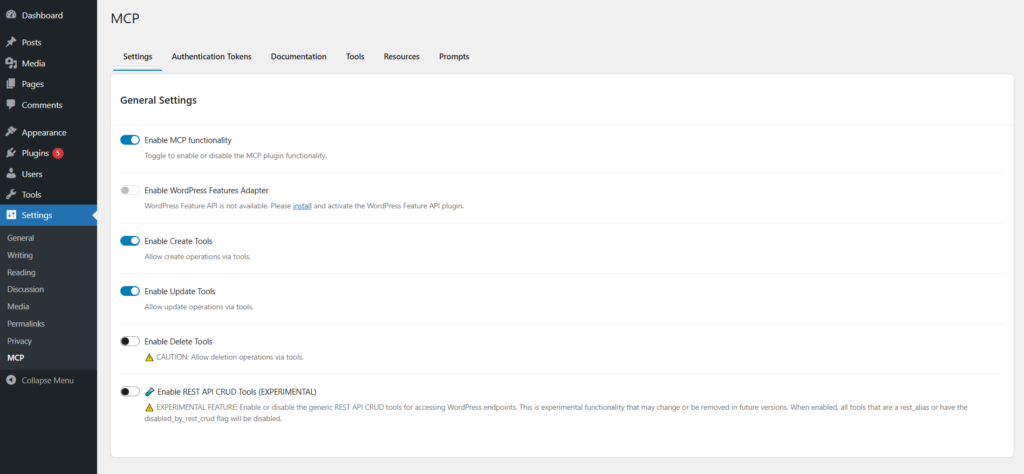
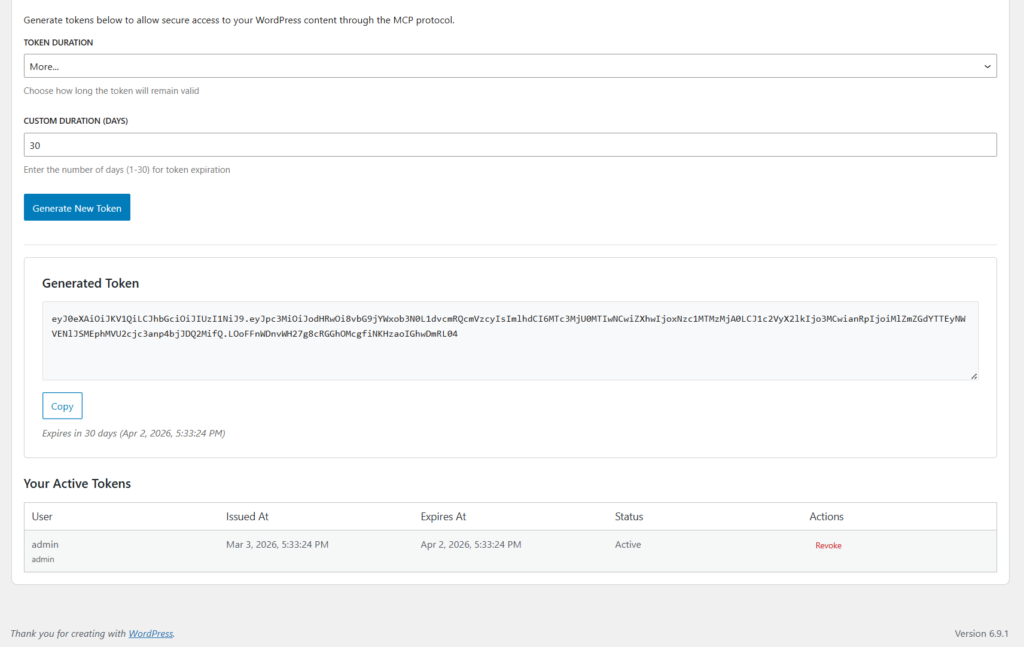
claude_desktop_config.json in a text editor{
"mcpServers": {
"wordpress-mcp": {
"command": "npx",
"args": [ "-y", "@automattic/mcp-wordpress-remote@latest" ],
"env": {
"WP_API_URL": "https://your-site.com/",
"JWT_TOKEN": "your-jwt-token-here",
"LOG_FILE": "optional-path-to-log-file"
}
}
}
}WP_API_URL with your Site URL.JWT_TOKEN with the Authentication Token generated in the last step.LOG_FILE → Optional local log pathIn Claude, your MCP server will show up in the Connectors tab (in settings) and Customize tab. You can also check the tools and resources provided by the server.
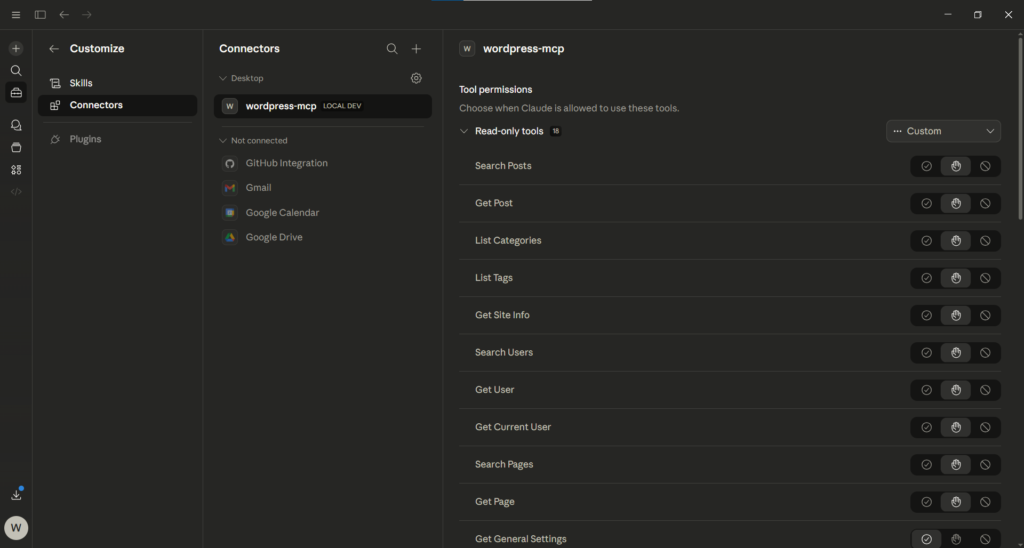
Now, run a prompt in a chat:
“What is my WordPress site title?”
Claude will return the site title from WordPress that indicates that the MCP integration is live.
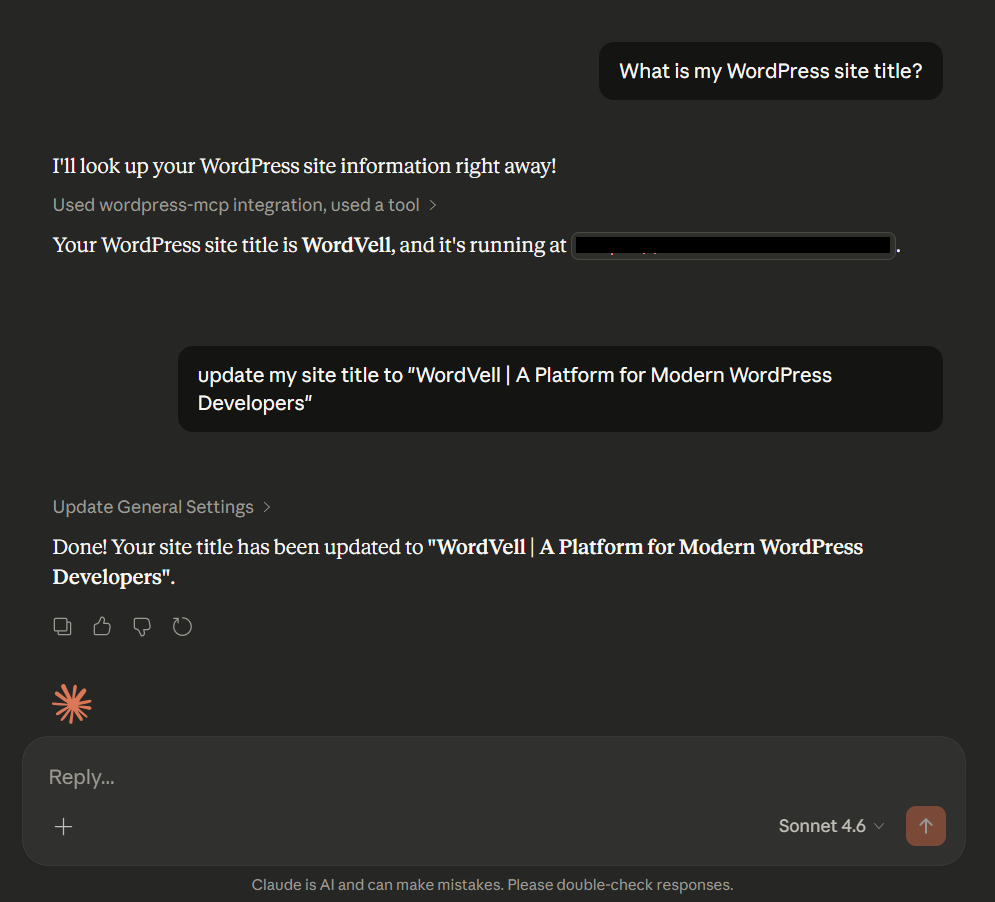
Now you have a working MCP connection, allowing AI to read, write, and automate WordPress tasks securely.
WordPress won’t lock or restrict you to a single MCP integration path. You actually have multiple ways to integrate MCP into your workflows, depending on your automation goals and how much control you want over the server.
Here are some MCP Options for you:
n8n is a powerful AI automation hub that helps you to develop automation workflows visually and interactively.
Its MCP server lets you connect Claude to WordPress through visual workflows.
If your team wants to integrate multiple platforms and apps in the same WordPress automation workflow without any code, n8n becomes an easy and best solution for you.
Check our full WordPress integration guide with n8n MCP.
OttoKit is also a no-code and visual automation platform for building fast and modular automation workflows.
It helps you connect your WordPress site to not only AI models like Claude but also allows your site to connect with 1300+ Saas Apps.
The one we really liked about OttoKit is that really fast to setup even faster with n8n.
We also have a dedicated OttoKit guide to set it up with WordPress. Go and check it out as well.
WordPress teams have introduced the WordPress Abilities API in version 6.9 as a basic framework to expose WordPress abilities and functionalities with AI models through MCP.
Now, the WordPress team has developed a WordPress MCP adapter, although it is available on GitHub as an independent plugin, but still not integrated into the core.
The WordPress MCP adapter will expose the registered WordPress abilities to the AI models, allowing them to fetch data or take actions on WordPress sites securely.
In the near future, we think this path will become the default MCP option in the WordPress ecosystem.
A growing ecosystem of open-source MCP servers by the WordPress community that support automation in WordPress.
Here are some popular ones:
This ecosystem keeps expanding, so you can choose the server that fits your workflow, as well as your security and privacy goals.
Here’s a simple example of how we used an MCP server to run a full Semantic SEO audit on WordVell without touching the WordPress dashboard.
We gave this prompt to Claude:
“Hey Claude, I want to improve the Semantic SEO of my WordPress website (WordVell). So, analyze all my current blog post titles and give me an optimized topic cluster that provides me with the pillar blog posts and the cluster topics.”
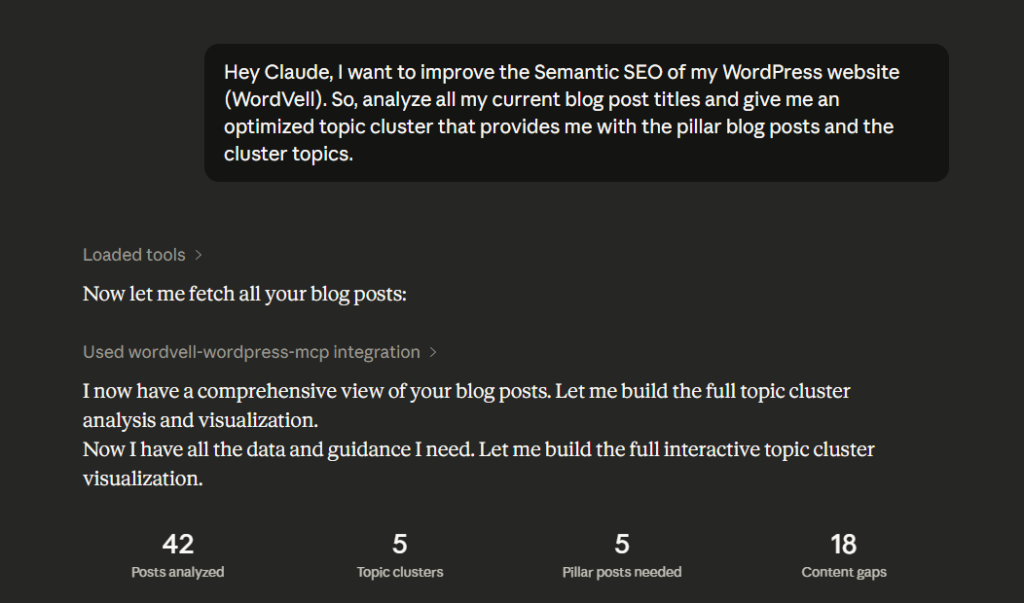
Claude analyzed every blog post through the MCP server, processed the titles, and returned five clean topic clusters we needed to establish.
It also highlights content gaps, which means the topics we hadn’t covered yet, and can be a good future opportunity.
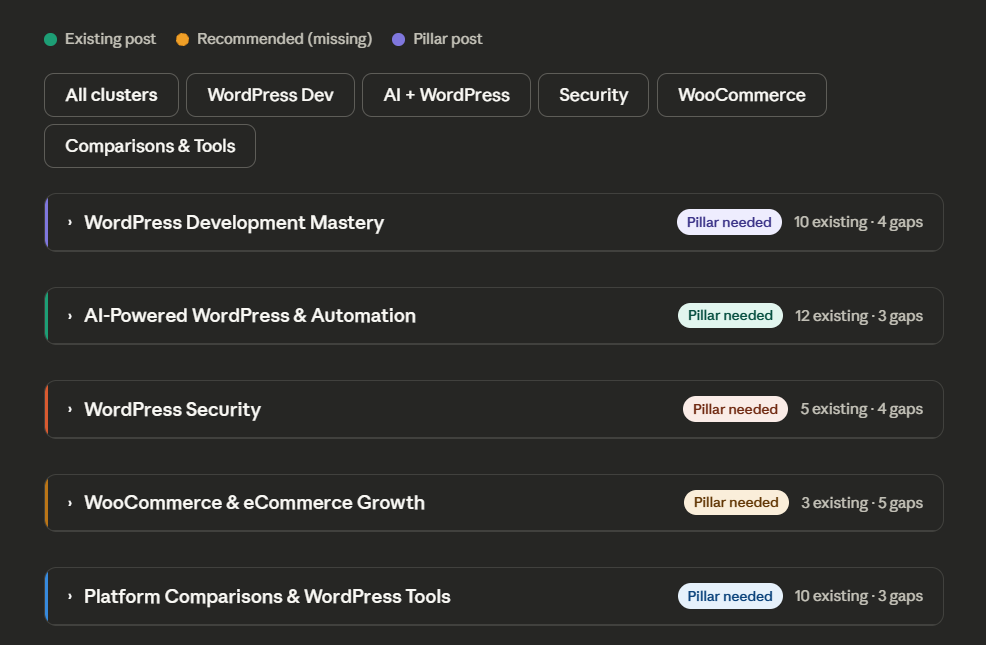
The best thing Claude does is that, beyond text only response, Claude generates interactive charts for each pillar and maps the existing blog posts to these clusters, and also highlights content gaps.
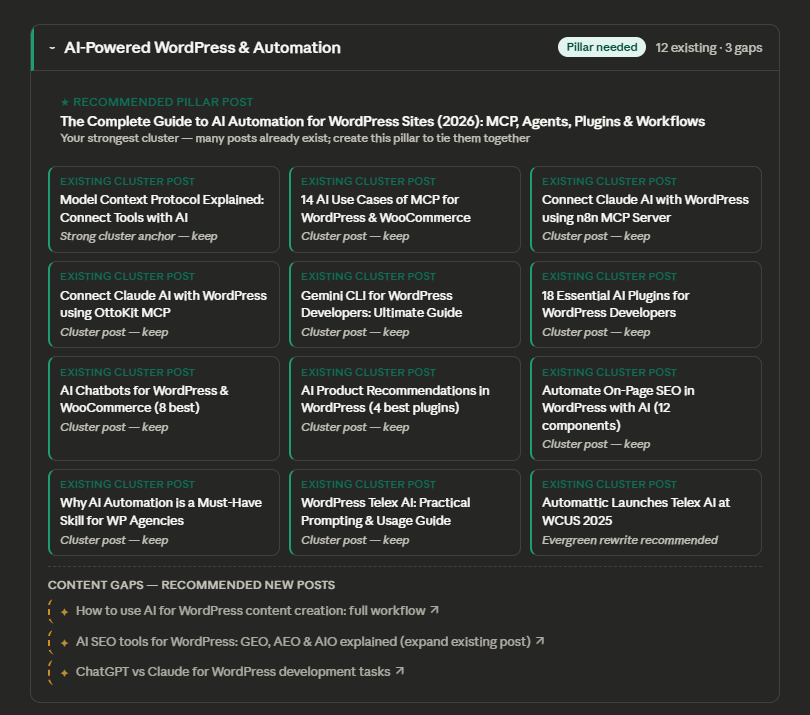
This level of analysis usually takes hours manually. MCP reduced it to a single natural-language request.
So, this is one practical example you see. You can use this for multiple tasks and operations inside your WordPress site.
We also highlighted some task ideas in the next section, which you can automate through MCP-powered AI models.
Till now, you have realized that MCP isn’t just a theory anymore. You can integrate it with your site and AI model for automation.
Now, we will highlight some real outcomes you can achieve with it. Here are a few high-value examples that show exactly what you can do with MCP and AI in WordPress:
| Task | Impact | Who Benefits |
|---|---|---|
| Auto-generate product descriptions in brand tone | Conversion uplift | E-commerce brands |
| Resolve support tickets referencing the KB. | Faster support | SMB online stores |
| Auto inventory sync from ERP/Sheets | Operational time savings | Large stores |
| Detect + refresh outdated content metadata. | Higher SEO rankings | Publishers & blogs |
| Build custom analytics reports. | CEO insights without BI tools | CEOs & Managers |
These are exactly the kinds of workflows MCP enables you to integrate into your site. You just ask in natural language to AI. AI will fulfill your Task using MCP.
Explore our detailed 14 Practical AI Use-cases of MCP for WordPress & WooCommerce.
You can create your own MCP server and connect it directly to your WordPress site. Although it is not as simple as that.
Developers can do this using Node.js or Python, and then deploy it.
Why would WordPress agencies or developers bother to give attention to custom developed MCP server?
Because, the custom MCP servers offer more control and security. It will also allow you to scale your integrations beyond WordPress. And AI models will also follow your logic, not someone else’s.
You can follow this official guide to develop your own Custom MCP server.
For agencies and CTOs managing dozens or hundreds of WordPress properties, MCP unlocks a completely new operations model.
You can deploy a centralized MCP server that controls a multi-site fleet from one command center, which can publish, audit, update, and secure across brands with unified automation.
In headless architectures, MCP becomes the central (orchestration) layer, bridging AI agents with decoupled frontend and backend workflows.
It also supports zero-downtime and A/B deployments, pushing version changes only where they’re validated.
You can also pair MCP with n8n, Open Claw, or OttoKit, and you will get event-driven pipelines such as AI that reacts to new orders, abandoned carts, trending topics in real time, or can post to social media automatically when a blog post is published.
You can just move from complex API integrations to connecting ERP, CRM, analytics, and WordPress, all with AI through one protocol, which is called MCP.
But the power raises responsibility. Enterprises need governance models, scoped abilities per agent, and audit logs.
The decisions made by automated AI systems must be monitored with care.
MCP gives an AI model with the power to change your entire WordPress environment.
That means security and privacy are compulsory in automation.
Every resource, every tool, every command must follow strict capability boundaries. This is not “give AI admin rights and hope.” This is zero-trust by design.
Here’s the security and privacy checklist:
| Requirement | What It Ensures |
|---|---|
| Zero-trust architecture | Agents only do what they’re allowed, nothing more. |
| Capability-scoped tools | No blanket admin access or wildcard permissions |
| Token-based authentication | Passwords aren’t shared or stored insecurely. |
| Detailed action logs | Full oversight + compliance-ready auditing |
| Secrets isolation | No sensitive keys exposed in plaintext |
| GDPR data minimization | User data is only processed with intent + consent. |
Enterprises must treat AI orchestration with the same rigor as DevOps deployments. Because the truth is simple:
A misconfigured and insecure MCP server can wipe a site in seconds; that’s why security isn’t optional.
Now, you have learned and seen how the Model Context Protocol (MCP) is bringing automation to WordPress sites.
What once required hours of manual clicking, custom API wiring, or hiring extra hands can now be handled through a single natural-language command to your AI using the MCP server.
Whether you’re a solo developer trying to manage time, an agency scaling operations across client sites, or an enterprise automating complex WordPress and WooCommerce workflows, MCP gives you a secure, standardized, and surprisingly simple way to make an AI model response based on real contextual data and take actions inside WordPress.
The barrier to entry is very low. The AI models and MCP servers are already available. The only question is how long you’ll wait before your competitors start to gain a competitive advantage.
So, start with the simplest MCP integration of Claude with WordPress, automate few tasks to feel the value, and then later scale to complex and multi-tool integration with your WordPress site through MCP.
And if you love our guide and want more guides and resources to scale your WordPress website and operations, then subscribe to our weekly WordVell Newsletter.