Discover the
Modern
WordPress with WordVell

WordPress 6.9 arrives on December 2, 2025 with new features that improve collaboration, expand core blocks, boost performance and give developers cleaner APIs to work with. Explore what is new for WordPress developers in the December 2025 update and learn how these changes can improve your workflow.
The December 2025 WordPress update is a meaningful moment for developers. It sets the tone for the New Year and brings improvements that make building, editing and managing sites feel smoother. If you work with themes, plugins or full site editing, this update deserves your attention.
Let us walk through the changes in a clear way so you can see how these updates help improve your workflow.
WordPress is moving toward a more collaborative and developer focused future. The updates released over the past two years show a steady shift toward modern workflows and better tooling.
The December 2025 update continues moving in the same direction. It brings stronger editing tools, more flexible blocks, performance improvements and cleaner APIs that help developers ship stable work with less effort.
More than anything, this update tries to reduce day to day friction. Whether you build client sites, create plugins or simply enjoy working with WordPress, these changes help you move faster with more confidence.
One of the biggest additions is the ability to comment directly on individual blocks inside the editor. These comments appear like small notes attached to a specific part of the content. It feels similar to collaboration tools many teams already use.
Why this helps
• Clients can point to the exact area they want changed
• Writers and editors can review drafts without long back and forth messages
• Developers can understand what needs attention without guessing
If you build custom blocks, this is a great time to test how your blocks behave when someone adds comments inside them. It keeps things smooth for teams and improves the editing experience.
The Option to Hide Blocks on the Front End
You can now hide any block from visitors while still keeping it visible inside the editor. This makes content staging much easier.
Useful when
• You are preparing a seasonal campaign
• You are revising copy before publishing
• You are experimenting with layouts
If you build themes or custom blocks, check how this hidden state interacts with your styling and scripts to ensure nothing breaks.
The command palette continues to evolve. You can open it with a simple shortcut and search for actions, settings or navigation items. It speeds up everyday tasks and makes the editor feel more like a pro focused tool.
Plugin developers can prepare their actions to integrate with the command palette so users can access them faster.
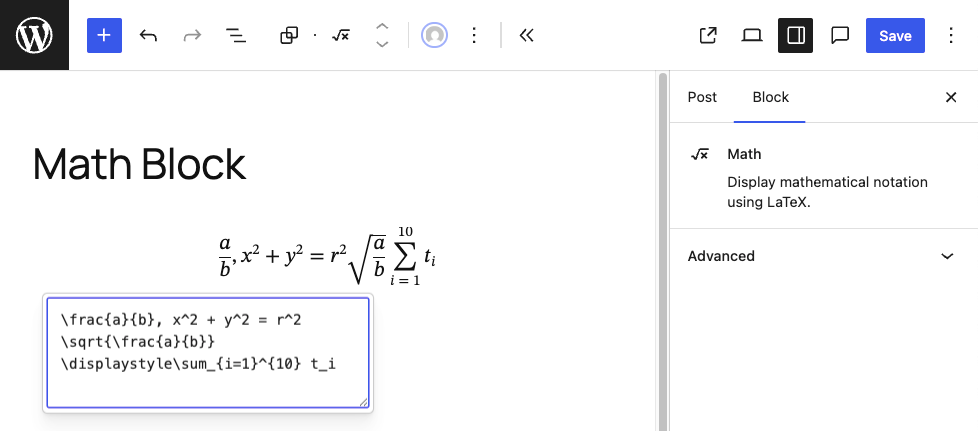
This update introduces several new blocks that give creators more flexibility without installing extra plugins. These include
• Accordion
• Math for LaTeX formulas
• Time to read for blog posts
• Breadcrumbs for navigation
• Terms query for listing taxonomy items
If you build themes, it is a good time to update your styling so these blocks blend in naturally. Also review your theme.json settings to see if new controls have been added that can improve your design consistency.
WordPress 6.9 brings major updates to developer APIs, making it easier to build fast, interactive, and intelligent websites while keeping code predictable and maintainable.
The Abilities API lets developers define clear inputs and outputs for functions. This ensures predictable behavior, simplifies plugin logic, and supports automation and AI-driven features in the future. Developers can register abilities with permission checks and expose them through REST endpoints, making their code safer and more reusable.
The Interactivity API enables developers to create dynamic, interactive components without heavy external frameworks. It helps manage client-side navigation, update content regions efficiently, and handle asynchronous actions. The result is faster, more responsive websites that stay true to the WordPress way of handling data.
These APIs simplify managing structured content in the editor. The Fields API now supports more field types, nested data, and robust validation. DataViews allow grouping, filtering, and rendering structured content consistently. For plugins that rely on custom fields or metadata, these updates make content handling smoother and more reliable.
Performance improvements include
• Cleaner template output handling
• More efficient block style loading
• Real time metadata synchronization during collaboration
These updates reduce the need for custom fixes, improve consistency between sites and make the editor feel faster especially on large pages.
Before you update any live site, take a moment to move through this short but important checklist.
Test the update on a staging site
Try the new version on a safe copy of your site first. It helps you catch issues before they reach visitors.
Check your custom blocks
Open the pages that use your custom blocks and see how they behave. Look at
• Comments inside blocks
• The hidden block option
• Layout and spacing
• Any scripts you attach to your blocks
This makes sure nothing looks broken after the update.
Review your theme
Load the new core blocks such as accordion, math, time to read and breadcrumbs. Make sure they match the rest of your design and follow your theme styles.
Test performance
Click through a few pages in both the editor and the front end. Notice how fast things load. If something feels slower or out of place, you can fix it early.
Check your plugin settings pages
Some plugins use custom screens in the admin area. Open them and confirm that everything loads as expected with the new editor changes.
Update your documentation
If you manage client sites or sell products, update screenshots and instructions so users see the correct interface and new features.
This release improves collaboration, adds new layout tools, enhances performance and sets the foundation for more advanced features arriving in 2026. For authors and educators, the new blocks open new possibilities for rich content.
For client focused developers, the performance and collaboration updates reduce friction in daily work. For plugin developers, the new APIs provide a cleaner and more predictable development experience.
Everything points to a more modern and enjoyable WordPress environment.
The December 2025 update is not about big visual changes. It focuses on everyday improvements that developers rely on. Better collaboration, clearer structure, stronger performance and a more reliable foundation. It is a steady and thoughtful step toward the future of WordPress and sets the stage for what is coming next.